1. Export an EDL marker file from DaVinci Resolve
- Select the sequence in your media tab.
- Make the right click on the sequence timeline in your media tab and it will open the popup.
- Navigate to: "Timeline > Export > Timeline Markers to EDL"
2. Use the "محول العلامات" to convert the EDL marker file into a CSV file
Open the free محول العلامات, select "DaVinci Resolve > Sequence (.edl)" and set "convert" to "CSV for Google Sheets". Generate and download the file. إذا واجهت مشكلات في تحويل الملف، يمكنك التواصل مع الدعم المجاني.
3. Import the CSV file into Google Sheets
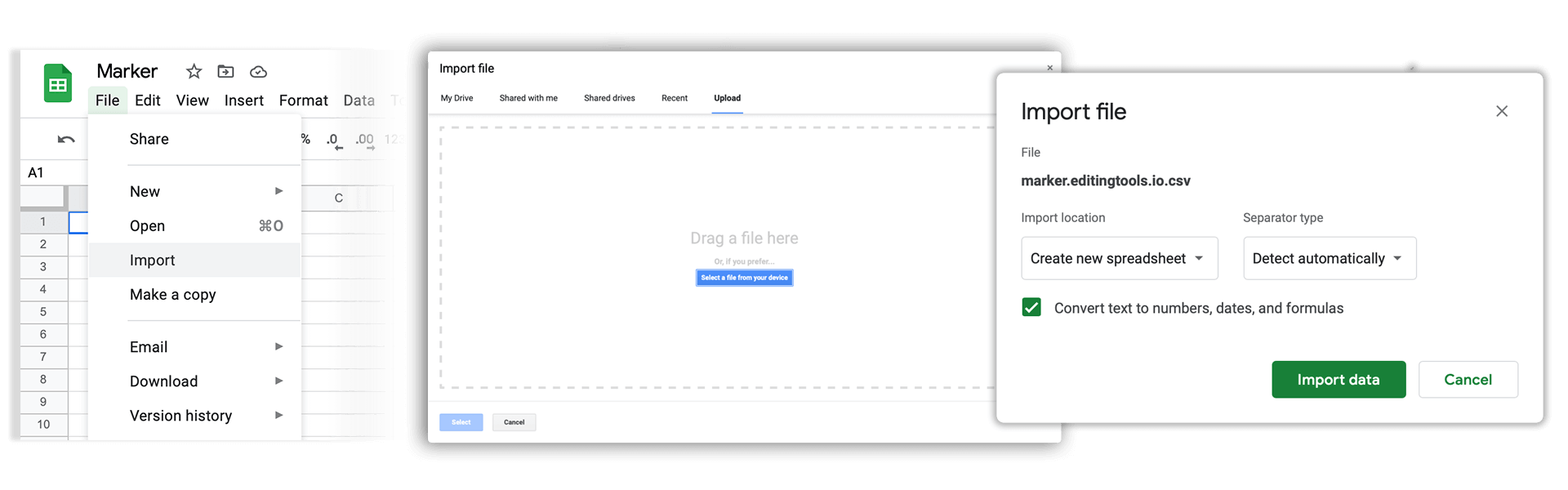
Open Google Sheets and go to "File -> Import". Upload the generated CSV file and press "Import Data" to generate the Sheet with all markers.
🚀 تم
هذا كل شيء الآن! إذا وجدت هذا الشرح مفيدًا، فيرجى مشاركته لدعمنا. وإذا كانت لديك أي اقتراحات حول كيفية تحسين سير العمل، فأخبرنا!