نوتة موسيقية

تمتع بإنشاء ورقة جديلة موسيقية نظيفة مع رموز زمنية ومدد وبيانات وصفية للمسار من تسلسل التحرير الخاص بك. قم بتحميل ملف XML أو EDL وإنشاء ملف CSV أو XLSX أو PDF أو TXT أو تنسيقات أخرى لاستخدامها في جداول بيانات Google أو Microsoft Excel أو Apple Numbers أو برامج مشابهة.

معدل الإطارات
التصدير
الإعدادات المسبقة
Warning! This preset only works for XLSX (Excel) exports.
Frame handles

Choose the music libraries that you want to check for more metadata:


قيد التنفيذ...

We created this tool to save you time!

30.000+

cue sheets created

1.500.000+

audio clips processed

15.000.000+

track metadata records

ماذا تفعل هذه الأداة؟

سينشئ منشئ ورقة الإشارات بسرعة قائمة بسيطة بجميع المقطوعات الموسيقية المستخدمة في مشروعك. يمكن للأداة قراءة التسلسلات من Media Composer وPremiere Pro وResolve وFinal Cut Pro. تدمج مسارات متعددة وتزيل القطع غير المرئية للحصول على قائمة نظيفة. استنادًا إلى أسماء الملفات، يمكن أيضًا إضافة البيانات الوصفية للمسارات الموسيقية تلقائيًا إلى ورقة الإشارات إذا كانت تأتي من إحدى مكتبات شركائنا. يمكن تخصيص التصدير باستخدام إعدادات مسبقة وتصديرها إلى العديد من التنسيقات المختلفة بما في ذلك CSV وXLSX وPDF.

ما هي تنسيقات الملفات التي يمكنني تحميلها؟

  • EDL - Edit Decision List (.edl)
  • XML - Final Cut 7 XML (.xml)
  • XML - Extensible Markup Language (.xml) (Avid Media Composer)
  • TXT - أدوات Avid Pro Tools TXT -> معلومات الجلسة كنص (.txt)
  • FCPXML - Final Cut Pro X (.fcpxml)
  • CSV (comma or semicolon separated) (.csv)
  • AAF - Advanced Authoring Format (.aaf) → only in our Cue Sheet Manager for Pro Users

Scan production music libraries for metadata

By partnering with over 20 production music libraries, the tool is able to automatically pull metadata for tracks from these libraries. The metadata contains not only the track name and artist but also details about the label, publisher, composer details, and shares. Please note that the available metadata depends on the library.

اطلع على الموسيقى من المكتبات التي تعمل معنا واجعل عملك أسهل باستخدام مقطوعات من تلك المكتبات.

هل تفتقد مكتبة أو هل تعمل في مكتبة موسيقية؟ اتصل بنا وكن شريكًا حتى يتمكن عملاؤك من الاستفادة من أداتنا. أن تصبح شريكاً هي عملية بسيطة ومباشرة.

ستتم إضافة البيانات الوصفية باستخدام أسماء الملفات. للتأكد من التعرف على جميع الأغاني، يجب عدم إعادة تسمية الملفات بعد التنزيل. لا نتحمل أي مسؤولية قانونية عن دقة البيانات. أنت ملزم بالتحقق من صحة ورقة الإشارات بنفسك.
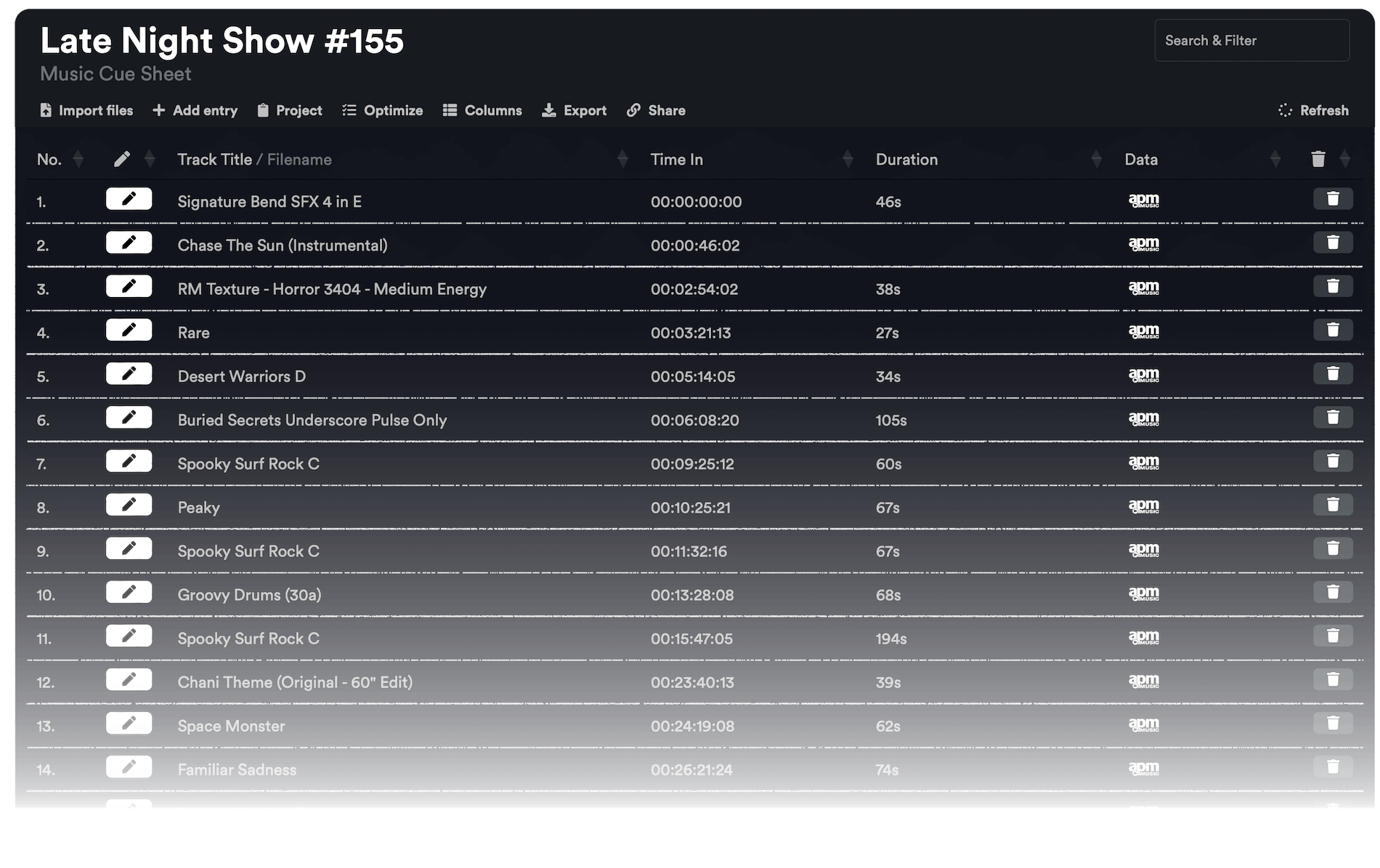
The workflow in detail

Learn how this cue sheet tool works.

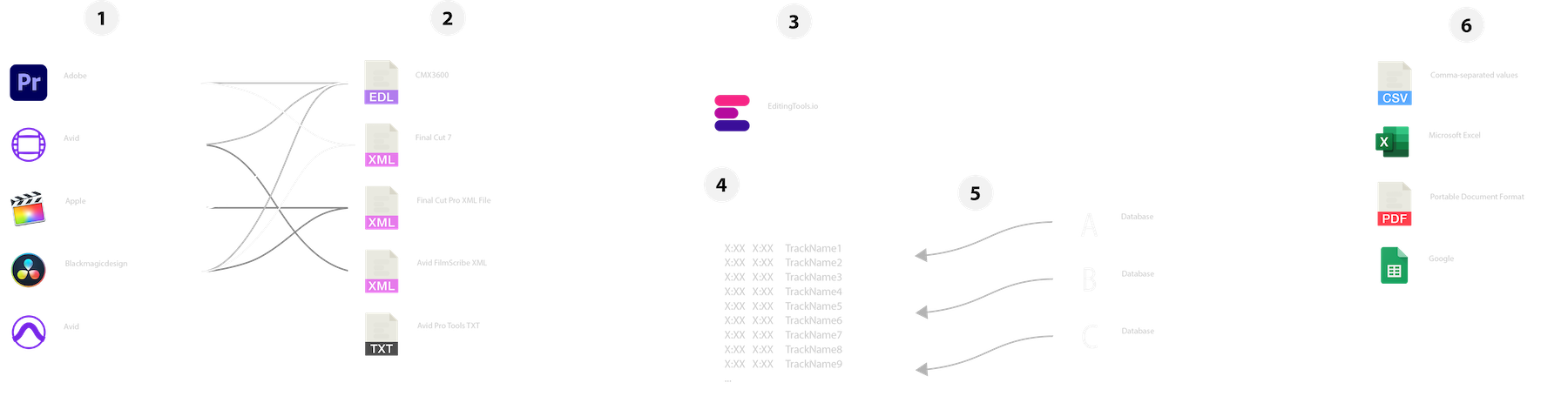
There are 6 simple steps you can follow to get the best workflow results:

  1. Prepare the sequence for which you want to create a cue sheet. It is best to make a copy and clean up the tracks, removing clips that do not belong there. It is a good idea to collect all the cues on 2 or 3 tracks and export only those tracks.
  2. Depending on the software you are using, you can export an EDL, XML or ProTools Session TXT. If you are using Adobe Premiere Pro or DaVinci Resolve, we recommend that you export a Final Cut 7 XML.
  3. Upload your sequence to our Music Cue Sheet Tool and choose your desired settings. The tool will analyze your sequence and create a sorted track list.
  4. The track list calculates the duration of each clip. Depending on your settings, similar clips are grouped together.
  5. If you enable the "Include metadata from music libraries" option and select the libraries from which you used music, the tool will check for additional metadata in those libraries. The information is pulled from data provided directly by our library partners via API or shared database. This includes information about the music album, the composer and artist up to library codes and label names.
  6. Once all the information is collected, it is exported to the file format of your choice. The recommended export format is CSV, which contains all the data you need and can be easily edited using Excel, Numbers, or Google Sheets.

الملفات التجريبية

جرّب ورقة الإشارات مع ملفاتنا التجريبية:

إعداد التسلسل الخاص بك

قبل تحميل التسلسل الخاص بك، يوصى بإجراء إعداد سريع له. أفضل طريقة للقيام بذلك هي تكرار التسلسل الخاص بك وإزالة جميع مسارات الصوت والفيديو غير الضرورية التي لا تريد أن تكون في ورقة الإشارات. من المهم أيضًا تسوية جميع المسارات في حال كنت تستخدم مقاطع صوتية ملفوفة/متداخلة. أيضًا، أزل "تأثيرات انتقالات الصوت" في حالة فشل الأداة.

دمج المقاطع المتداخلة المتطابقة

عندما يتم تمكين هذا الخيار، يتم دمج المقاطع المقطوعة إلى أجزاء متعددة في التسلسل الخاص بك تلقائيًا في إدخال واحد، طالما لا يوجد فاصل بينها. إذا عثرت الأداة على نفس المقطع في مسارات متعددة، فسيتم دمجها أيضًا وعرضها كإدخال واحد.

استخدم مقابض الإطارات للعثور على المقاطع المتطابقة ودمجها

استخدم هذا الخيار لضم المقاطع حتى لو كانت هناك فجوة بينها. يمكنك تحديد نطاق من 1 إلى 500 إطار ليتم تغطيتها. إذا وجدت الأداة نفس المقطع على مسارات متعددة، فسيتم دمجها أيضًا وعرضها كإدخال واحد.

الإعدادات المسبقة

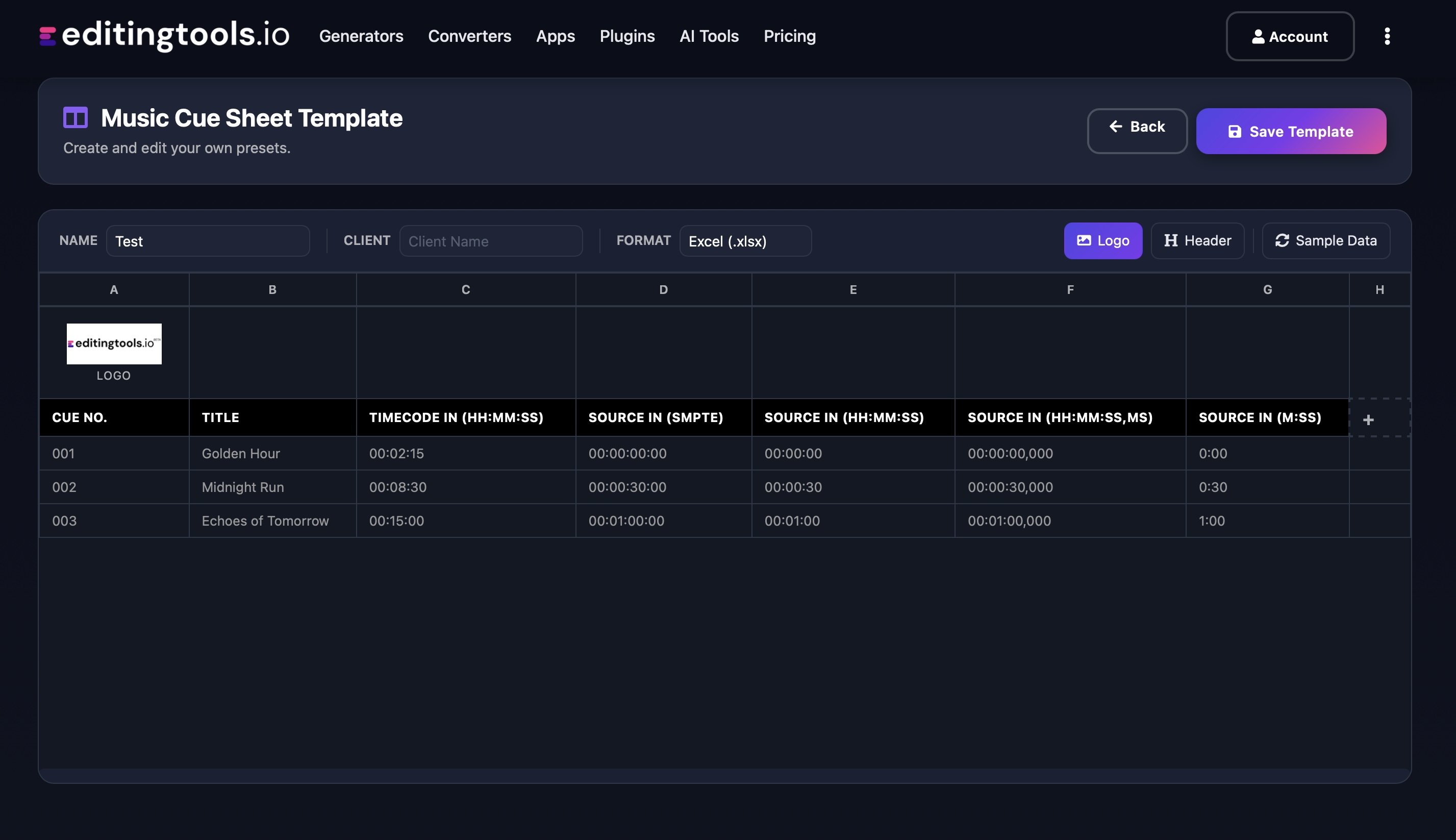
يمكنك تخصيص الأعمدة في ملفات التصدير. اختر من بين العديد من القوالب العامة أو اضغط على علامة "+" لإنشاء إعدادك المسبق الخاص بك. هناك إمكانيات لا حصر لها لعرض الرموز الزمنية والأطوال والبيانات الوصفية الفردية. لحفظ الإعدادات المسبقة يجب عليك تسجيل الدخول.

Need more? Check out our Music Cue Sheet Manager.

Key Features

  • Compatible with Media Composer, Pro Tools, Premiere Pro, Resolve, FCP and other editing software.
  • Merge tracks and remove invisible cuts automatically
  • Auto-fill metadata for over 15M+ tracks from 20+ partner libraries
  • Build and integrate your own metadata database
  • Customizable exports (CSV, Excel, CISAC & APRA)

Add metadata to your personal EditingTools database or library

Our tool supports a list of default values that can be added to the search database, which are explained below. Not all values are mandatory. Additional columns are possible.

NameTypeDescription
file_nameString (max. 200 characters)Filename up to 200 characters. If a filename is longer, it is truncated. If there are several variations of a file name, they can be listed in a column file_name_2, file_name_3, ...
track_titleString (max. 200 characters)Name of track
track_numberIntTrack number within the album.
track_durationIntTrack duration in seconds.
track_codeString (max. 100 characters)Optional track code (can include numbers and letters).
track_idIntA unique database track ID, must be numeric. Optional.
artistString (max. 200 characters)This is an optional artist name. If this value is empty, most cue sheets will automatically use the composer's values.
composerString (max. 200 characters)Composer Name. Multiple composers can be separated by a semicolon, e.g. "John Doe; John Smith".
composer_societyString (max. 200 characters)Name of the Composer Society. If a track has multiple composers, use semicolons to separate the societies.
composer_numberString (max. 200 characters)Number of the Composer. If a track has multiple composers, use semicolons to separate the number.
composer_shareString (max. 200 characters)Share of the Composer. If a track has multiple composers, use semicolons to separate the shares. Value between 1 and 100.
ownerString (max. 200 characters)
publisher
publisher_name
String (max. 200 characters)Publisher Name. Multiple publishers can be separated by a semicolon, e.g. "Pub1;Pub2".
publisher_societyString (max. 200 characters)Name of the Publisher Society. If a track has multiple publishers, use semicolons to separate the societies.
publisher_numberString (max. 200 characters)Number of the Publisher. If a track has multiple publishers, use semicolons to separate the number.
album_titleString (max. 200 characters)
album_catalog_numberInt
album_catalog_codeString (max. 200 characters)
album_release_dateDate (YYYY-MM-DD)Album release date. Leave blank if unknown.
album_disk_numberIntOptional disk number of the album.
album_total_discsString (max. 200 characters)Total number of disks in an album.
label_nameString (max. 200 characters)Name of the label.
label_codeIntLabel code, without "LC".
isrcString (max. 100 characters)
iswcString (max. 100 characters)
eanString (max. 100 characters)
upcString (max. 100 characters)
gemaString (max. 100 characters)
catalog_nameString (max. 200 characters)Name of the catalog/library the track is in.
bpmInt
genreString (max. 200 characters)

أدلة إرشادية سريعة

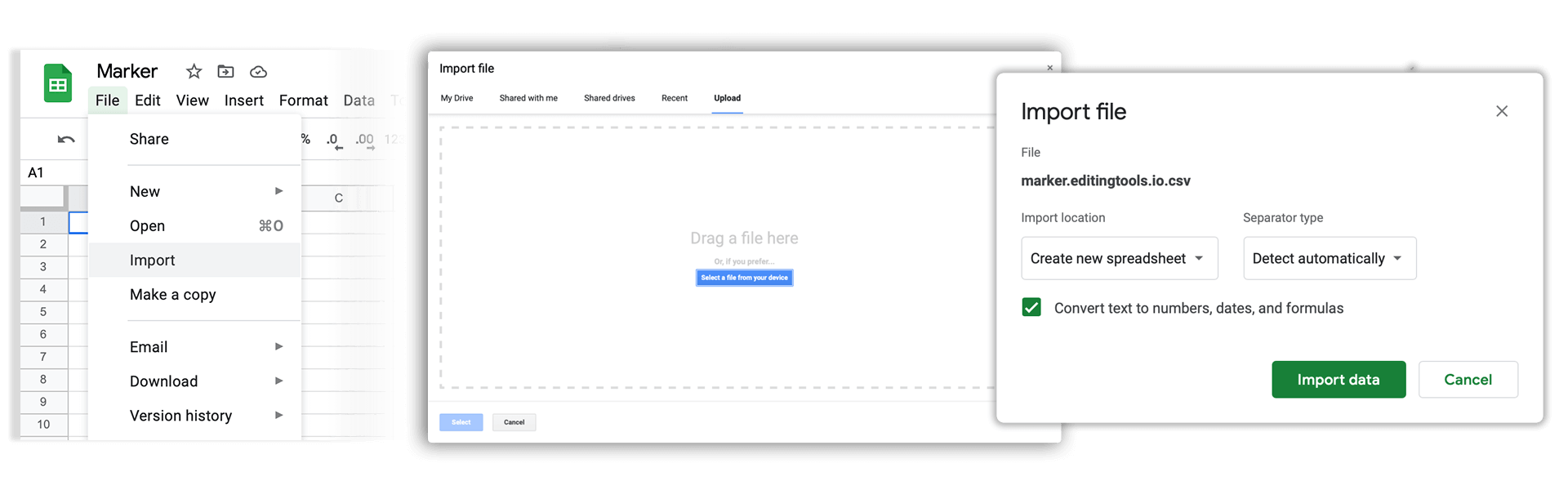
How do I import a csv file into Google Sheets?

Open Google Sheets and go to "File → Import". Upload the generated CSV file and press "Import Data" to generate a Sheet.

How do I import a csv file into Apple Numbers?

Open Numbers and go to "File → Open". Simply open the CSV file.

الدعم

إذا كانت لديك أي أسئلة أو طلبات ميزات، يُرجى التواصل مع فريق الدعم لدينا. يسعدنا مساعدتك!

الأسئلة الشائعة

No, you still need to send out the final cue sheet. This tool will only help you to create them more quickly.

In order to upload AAF files, you will need a PRO account and to use our Cue Sheet Manager.

Our Cue Sheet Manager allows to edit entries.

قم بأتمتة مهام سير عملك باستخدام واجهة برمجة التطبيقات (API) الخاصة بنا

سواء كنت مطورًا أو ترغب فقط في أتمتة المزيد من العمليات باستخدام أدوات مثل Zapier أو Make، يمكنك بسهولة دمج هذه الأداة في مهام سير العمل الخاصة بك باستخدام واجهة برمجة التطبيقات الخاصة بنا. تعرَّف على المزيد حول دمج واجهة برمجة تطبيقات REST في وثائق واجهة برمجة التطبيقات الخاصة بنا.

وثائق واجهة برمجة التطبيقات